Touch Zones
CANEO series5x SENSORswitches offer one to four touch zones.
Configuration options
For each zone, its behavior can be configured as follows.
- Sensor Mode (Dynamic / Static / Toggle / Toggle Exclusive)
- Touch Sensitivity (High / Middle / Low)
- Minimum Actuation Time
- Output Activation Delay
- Output Snap Time (for Static Mode)
- Output Minimum Impulse Time
For details, see the respective IO-Link ISDUs.
Zone numbering
The touch zones 1 to 4 are enumerated depending on the product variant as follows.
| Product Variant | Zones | Zone 1 | Zone 2 | Zone 3 | Zone 4 |
|---|---|---|---|---|---|
| Cx50 | 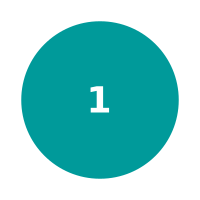 | entire sensor area | |||
| Cx52H | 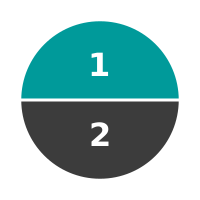 | upper half of sensor | lower half of sensor | ||
| Cx52V | 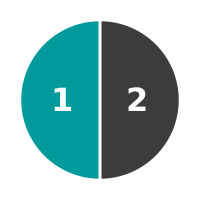 | left half of sensor | right half of sensor | ||
| Cx53D | 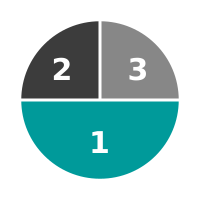 | lower half of sensor | up left quarter of sensor | up right quarter of sensor | |
| Cx53L | 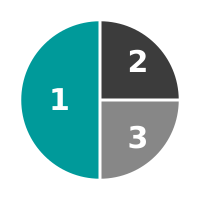 | left half of sensor | up right quarter of sensor | down right quarter of sensor | |
| Cx53R | 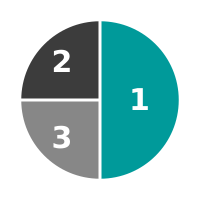 | right half of sensor | up left quarter of sensor | down left quarter of sensor | |
| Cx53U | 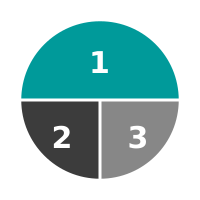 | upper half of sensor | down left quarter of sensor | down right quarter of sensor | |
| Cx54 | 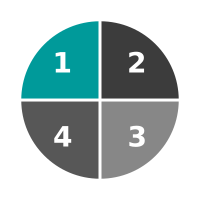 | up left quarter of sensor | up right quarter of sensor | down right quarter of sensor | down left quarter of sensor |
Output link
On CANEO series50 and series52, touch zone 1 will operate Output 1 (Pin 4 on M12 connector / Pin 1 on milligrid connector / black wire). If available on the series52 product variant, touch zone 2 will operate Output 2 (Pin 5 on M12 connector).